SuperCam Plus - Download App on Your Android, iOS & PC
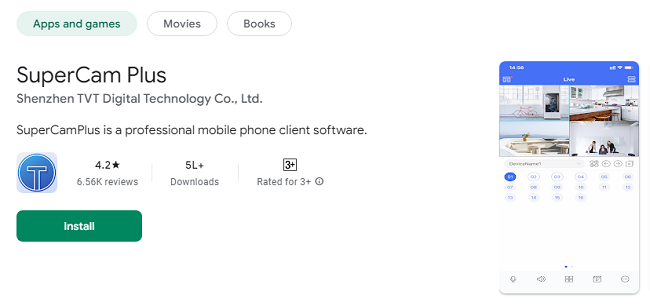
SuperCam Plus is a professional mobile phone application designed for seamless remote monitoring and management of digital video recorders (DVRs), IP cameras, and network video recorders (NVRs). Tailored for CCTV surveillance, it enables users to access live footage, playback recorded video, and control various camera functions from anywhere in the world. Whether you are managing home security, a business, or a large surveillance network, SuperCam Plus offers robust tools to ensure peace of mind and enhanced security.
Features of SuperCam Plus
Real-Time Video Monitoring
SuperCam Plus allows users to view live video streams from multiple cameras simultaneously. This real-time access ensures that users can monitor events as they happen, providing instant situational awareness.
Playback and Recording
The app provides the ability to view recorded footage, making it easy to review past events. Users can fast-forward, rewind, and pause playback to focus on critical moments.
Multi-Channel Support
SuperCam Plus supports multiple channels, enabling users to monitor several cameras on a single interface. This feature is particularly useful for large-scale surveillance systems.
PTZ (Pan-Tilt-Zoom) Control
The app offers PTZ control, allowing users to remotely adjust the camera's position and zoom levels. This ensures optimal coverage of the surveillance area and detailed viewing when needed.
Snapshot and Video Capture
Users can take snapshots or record video clips directly from the app. These can be saved locally on the mobile device for quick access or evidence collection.
Alarm Notifications
SuperCam Plus supports push notifications, alerting users to motion detection or other triggered alarms. This ensures users are instantly aware of any potential security breaches.
Two-Way Audio
For cameras equipped with microphones and speakers, the app facilitates two-way audio communication. This is ideal for remote communication in scenarios like monitoring visitors or instructing employees.
User-Friendly Interface
The app features an intuitive interface, making it accessible to both tech-savvy users and those less familiar with surveillance technology.
How to Install SuperCam Plus App on Your Device?
Download and Installation
For Android Devices: Open the Google Play Store, search for “SuperCam Plus,” and click “Install.”
For iOS Devices: Open the App Store, search for “SuperCam Plus,” and tap “Get” to download the app.
Initial Setup
Once installed, open the app and grant the necessary permissions, such as access to the camera, storage, and notifications.
Create an account if required or log in with existing credentials. Some versions may support local login without an account.
Adding a Device
Click on the “Add Device” or “+” icon.
Choose the method for adding the device: QR Code Scan, IP/Domain, or Local Search.
Input the necessary details such as the device name, IP address, port number, username, and password.
Configuring Settings
Adjust camera settings such as resolution, frame rate, and recording modes.
Set up alarm triggers, notification preferences, and PTZ presets if applicable.
Connecting to the Network
Ensure that both the mobile device and the cameras are connected to the internet.
Test the connection to verify successful integration.
How to Use SuperCam Plus App?
Viewing Live Streams
Open the app and select the desired camera from the list.
View the live feed and use gestures to zoom or switch between cameras.
Playback and Video Retrieval
Navigate to the playback section to select a date and time for viewing recorded footage.
Use the timeline to scroll through recorded events.
PTZ Control Usage
Tap the PTZ control option to move the camera in different directions or zoom in/out.
Taking Snapshots and Recording Clips
During live viewing or playback, click the snapshot or record button to save images or videos.
Managing Notifications
Access the notification center within the app to review recent alerts and take action as needed.
Adjusting Camera Settings
Modify resolution, brightness, and other camera parameters from the settings menu.
Pros of SuperCam Plus
Remote Accessibility
Users can monitor their surveillance systems from anywhere, providing flexibility and convenience.
Multi-Camera Support
Managing multiple cameras within a single app makes it ideal for businesses or larger properties.
Customizable Alerts
Motion detection and alarm notifications can be customized to reduce false alarms and enhance responsiveness.
User-Friendly Design
The intuitive interface ensures that even beginners can navigate the app with ease.
High Compatibility
Supports a wide range of DVRs, NVRs, and IP cameras, making it versatile across different brands.
Secure Communication
Offers encrypted data transmission to protect user privacy and sensitive information.
Cons of SuperCam Plus
Occasional Connectivity Issues
Users may experience occasional connection drops, especially on slower networks.
Limited Advanced Features
Compared to some high-end surveillance software, it may lack advanced analytics like facial recognition or license plate detection.
Dependent on Network Quality
The app’s performance heavily depends on the quality and stability of the internet connection.
Learning Curve for Advanced Features
While basic functions are easy to use, more advanced settings may require a learning curve for new users.
Device Compatibility Variations
Some features may not be available on all devices, depending on hardware compatibility.
Tips for Optimizing SuperCam Plus Usage
Ensure Stable Network Connectivity
Use a strong Wi-Fi connection or high-speed mobile data for optimal performance.
Regular Firmware Updates
Keep the app and connected devices updated to ensure compatibility and security.
Optimize Camera Placement
Position cameras strategically for maximum coverage and minimal blind spots.
Customize Notifications Wisely
Adjust sensitivity levels to reduce false alarms from pets or weather changes.
Backup Important Footage
Regularly download and backup critical video footage to avoid data loss.
Frequently Asked Questions
1. What is SuperCam Plus?
SuperCam Plus is a mobile app used for monitoring CCTV cameras, DVRs, NVRs, and IP cameras remotely.
2. Where can I download SuperCam Plus?
You can download it from the Google Play Store (for Android) or the Apple App Store (for iOS).
3. Is SuperCam Plus free?
Yes, the app is free to download, but some advanced features may depend on the devices you connect.
4. How do I add a new device to SuperCam Plus?
Open the app, click the “+” or “Add Device” button, and follow the prompts to scan a QR code or enter the device's IP address.
5. Can I view multiple cameras at once?
Yes, SuperCam Plus supports multi-channel viewing so you can watch multiple camera feeds simultaneously.
6. Does SuperCam Plus work without the internet?
No, the app needs an internet connection to access remote cameras and devices.
7. Can I control the camera’s position using the app?
Yes, if your camera supports PTZ (Pan-Tilt-Zoom), you can control its movement through the app.
8. How do I receive motion detection alerts?
Enable push notifications in the app’s settings to receive alerts when motion is detected.
9. Can I take snapshots or record video using the app?
Yes, you can capture snapshots or record clips while viewing live streams or playback.
10. How do I playback recorded footage?
Go to the “Playback” section in the app, select the camera, and choose the date and time you want to review.
11. Is SuperCam Plus secure?
Yes, it uses encryption to ensure secure data transmission between the app and devices.
12. Can I use SuperCam Plus on multiple devices?
Yes, you can log in on multiple mobile devices using the same account.
13. What do I do if the app cannot connect to my cameras?
Check your internet connection, ensure the cameras are powered on, and verify the IP settings.
14. Does SuperCam Plus support two-way audio?
Yes, if your camera has a microphone and speaker, you can communicate using the app.
15. How can I adjust video quality?
Go to the settings in the app and choose the desired resolution or frame rate for the video stream.
16. Can I use SuperCam Plus for multiple locations?
Yes, you can add cameras from different locations and manage them all within the app.
17. How do I stop receiving too many notifications?
Adjust the motion sensitivity settings or turn off certain alerts in the app’s notification settings.
18. Is it possible to share camera access with others?
Yes, you can share your account details or set up shared access if supported by your device.
19. What should I do if I forget my password?
Use the “Forgot Password” option on the login screen to reset your password.
20. Can SuperCam Plus work with any CCTV system?
It works with most DVRs, NVRs, and IP cameras, but compatibility may vary depending on the brand and model.
Conclusion
SuperCam Plus is a powerful and reliable solution for remote video surveillance management. With its real-time monitoring, playback capabilities, and intuitive controls, it provides an excellent balance of functionality and ease of use. While it may encounter occasional connectivity issues and lacks some advanced features, its benefits far outweigh the drawbacks for most users. Whether for personal or professional use, SuperCam Plus is a valuable tool for enhancing security and peace of mind.